
We are a group of Forex traders with one mission: make a winning robot. After years of development, we have achieved our goal.
We now have to aim higher.
We want to share the work we’ve done and accrue resources so that we can make the software even more effective.
I hope that you join us on our mission to create the best trading system to ever hit the market. We know what we have in Fury is profitable and believe we can make all our clients successful regardless of skill level.
Internal Rankings

While nearly every other developer in this market will rate themselves as 100% across the board, we have a much more fluid rating system of our progress as a company. We believe that it’s important to evaluate ourselves not only based on our opinions, but based on the responses we get from the community.
In order to achieve more, and take the next step as a company, we here at Forex Fury have to be honest with our current capabilities, so that we understand where we can improve.
We’ve been providing our services going on 6 years now, and there’s no signs of slowing.
Our Team
In 2021 we’ve expanded our team, brought in new analysts, developers, and other supporting staff to ensure that our service is moving in the right direction. We’ve addressed critique from clients, critics, and are getting better at our jobs every single day, so that you get the service and the gains that you deserve.


Trading Approach
Our trading method is based on the fundamental properties of time restriction. In order to provide a viable trading robot, the first thing you need to do is limit your losses, and we feel the easiest way to do this is to create a system built for a specific time period.
Historically, we’ve used high risk principles with large or no stop losses, but we’re working on shifting to better risk reward ratios to make our software safer during volatile markets.
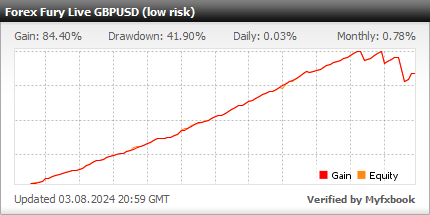
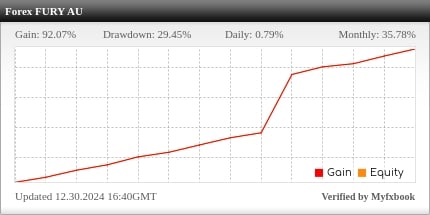
We open trades 4-5pm EST. During this time, the market is lacking in volatility which is perfect for an advanced scalping approach to pick up easy wins. This means, that our robot is in and out of the market within 1-2 hours every single day. The approach has proven to be profitable on multiple pairs, which you can see in the trading accounts we provide on the front page of our website.
Where the majority of robot developers go wrong, is in trying to code a project that is too large, or all encompassing. In focusing on 1 hour per day, we’ve been able to drill down and test 100x more data than our competitors.
While some traders prefer to trade the entire day, this is not a simple task with an automated robot, and it’s one of the main reason our competitors fail.
Our methodology is simple, but our approach to fundamental and technical analysis is industry leading.
Fury Settings
• Username: This is the username you created when you first signed up.
• Trade Direction: You can have the robot trade longs & shorts, just longs or just shorts.
• Fixed lot size: To use a fixed lot size you need to set “Use Increamental Lot Size” to false.
• Use Incremental Lot Size: This is the money management, if set to TRUE, this feature will use Risk per Trade, % to determine lot size automatically.
• Risk per Trade, %: A percentage number that will determine the lot size of each trade if Use Incremental Lot Size is se to TRUE.
• Stop Loss: The Stop Loss the EA will use to exit at a loss.
• Take Profit: The Take Profit the EA will use to exit at a win.
• Max Orders: The amount of orders the robot will allow to be open at one time.
• Reverse Strategy: A strategy that does the opposite of the original strategy (we haven’t found much practical use for this addition yet).
• One Set Trade Per Day: The EA will only open 1 set of trades per day. We have found that the robot often makes a mistake in the rare case when it opens a second set of trades.
• Only Range Trading: This filter ensure the bot only opens trades during ranging market conditions. This is a very good filter, an is excellent for low risk setups, but it limits the amount of trades you will see significantly.
• Max Spread: The max spread is a great feature that limits volatility. This is in points. The default max spread is 5. If your spread is above 5, the robot will not open any trades, and you will have to increase this number, or get a lower spread brokerage account. You can see the current spread on your chart at all times where it says “current spread” in the read out on the chart.
• Max Slippage: This is the max slippage that the EA will open trades at.
• Magic Number: If you run multiple pairs at the same time (which we don’t recommend) you have to make sure each chart has a different magic number. It can be, 1, 2, 3, it doesn’t matter, it just has to be different.
• Dynamic Retrace: This is a new feature in V4. It’s a stop loss that you can use instead of the normal stop loss or trailing stop loss. We are not using this feature in any of our accounts yet.
• Retrace Trigger: Tf the EA goes hits this number lets say -300
• Retrace Exit: Then this number sets the TP to -50 and sets a SL at double this number so if the trade returns to 50 pips it exits at a loss or goes 100 more pips it hits SL
• Martingale: This is a basic martingale strategy. We are not using this in any of our accounts yet, but plan on testing it soon.
• Lot Multiplier: Increasing the size of trades after losses as part of the martingale strategy.
• Max. Steps: Is the maximum amount of steps the martingale strategy will use when increasing trade size.
• Trailing Stop: The trailing stop is another stop loss that we offer. We are using this on a couple of our accounts successfully. The EA will look to lock in profits by trailing the trade and setting new stop losses as the trade goes further into a winning position.
• Trailing Start: This is the amount of pips the EA has to hit in order to trigger the trailing stop function.
• Trailing Step: This is the amount of pips the EA will use to move behind the start.
• Trailing Stop: the stop loss distance after each new trail.
• Start time: The time that Fury will begin looking for trade opportunities.
• Stop time: The time that Fury will stop looking for trade opportunities. Trades that are opened will still continue to trade outside of these times until they are completed. Trades do not close based on time, but based on TP, SL etc.
• Trade on Mondays, Trade on Tuesday, Trade on Wednesday, Trade on Thursday, Trade on Friday: You can specify which days you will allow Fury to trade on your account. Many clients will set Friday to false, to avoid trades staying open over the weekend.
• Display Panel: True or False. This is the on chart print out.
• BG Color, Text Color, Text Font Size, Offset X, Offset Y: These are all settings pertaining to the on chart panel. Can change the color, size, and location on your chart.
Trading Accounts
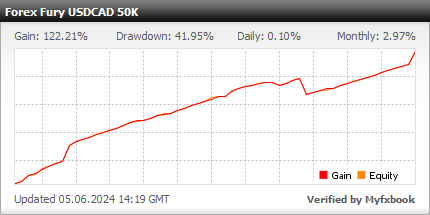
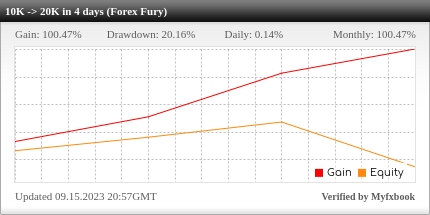
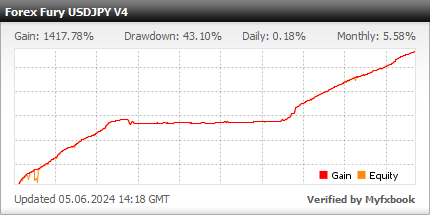
We are always adding more trading accounts, testing new pairs, and finding different ways to be successful with Fury. It’s a great idea to test multiple setups to see which setting of ours suits your personal trading style best.
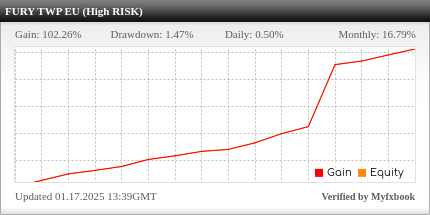
Trading Risk
The Forex Fury robot is very capable of trading low risk, medium risk and even high risk strategies.
In fact, a lot of the strategies we test on live trading accounts are high risk. While most robot developers are scared of this, we are not. We provide live trading accounts to test the limits of our methodologies, and to improve.
Just because we often use high risk strategies doesn’t mean you have to though.
With new additions like our range filter and max spread, we’ve been able to let clients of all risk profiles utilize our robot.
Don’t be worried if you see one of our accounts with a large drawdown, as we are just pushing the limitations to learn and grow.
We also have built in money management, lot size, and max orders so you can specify how many trades you want to open at one time, and how big you want them to be.
If you want to go slow and steady, you can, or if you want to try and flip an account quick, you can.